OVHcloud MKS + Cromwell + Funnel Installation Guide
Table of Contents
- Overview & Architecture
- Prerequisites
- Environment Setup
- Deploy Cluster
- Phase 1: Create MKS Cluster
- Phase 2: Node Pools & Autoscaling
- Phase 3: Manila NFS Shared Storage
- Phase 4: S3 Object Storage
- Phase 5: Private Container Registry
- Phase 6: Deploy Funnel TES
- Phase 7: Configure Cromwell
- Phase 8: Verification & Testing
- Container Images
- Troubleshooting
- Appendix: Useful Commands
- Summary
Overview & Architecture
This guide automates the deployment of a genomics workflow platform on OVHcloud MKS (Managed Kubernetes Service) consisting of:
- Kubernetes Cluster: 1 fixed system node (always-on, kube-system + app infrastructure) + autoscaled worker nodes
- Funnel: Task Execution Service (TES) for running containerized tasks (via nerdctl)
- Cromwell: Workflow Manager (WDL language support, can run on-prem)
- Storage:
- Manila NFS (150 GB ReadWriteMany) for shared workflow data
- S3 Object Storage (OVH-compatible) for task inputs/outputs/logs
- Cinder Volumes (per-node, auto-expanding with LUKS encryption) for local task disk
- Registry:
- OVH Managed Private Registry (MPR) for custom task container images
Architecture Diagram
                          ┌─────────────────────────────┐
                          │   Cromwell (localhost:7900) |
                          │      depoloyed on-prem      |
                          │   (submits WDL workflows)   |
                          │                             |
                          └──────────────┬──────────────┘
                                         │ HTTP/REST
                          ┌──────────────▼──────────────┐
                          │   Funnel TES (LoadBalancer) │
                          │   (executes tasks)          │
                          └──────────────┬──────────────┘
                                         │
          ┌──────────────────────────────┼
          │                              │
          |                 ┌────────────┘─────────┬────────────────────┐
    ┌─────▼──────┐   ┌──────▼───────┐       ┌──────▼───────┐     ┌──────▼─────────┐
    │ system-    │   │ karpenter-   │       │ karpenter-   │ ... │ karpenter-     │
    │ node       │   │ c3-4-node-1  │       │ c3-4-node-2  │     │ r3-8-node-1    │
    │ (d2-4)     │   │ (c3-4/8GB)   │       │ (c3-4/8GB)   │     │ (r3-8/32GB)    │
    └─────┬──────┘   └──────────────┘       └──────┬───────┘     └─────┬──────────┘
          │                                        │                   │
          │      (funnel-disk-setup expands        |                   |
          |       /var/funnel-work on demand)      │                   │
          │                                        │                   │
          └──────────────────────────┬─────────────┘───────────────────┘
                                     │
              ┌──────────────────────▼───────────────┐
              │   Private Neutron vRack / vrack      │
              │   (shared network for storage)       │
              └─────────────┬────────────────────────┘
                            │
                  ┌─────────┴─────────────────────────┐
                  │                                   │
      ┌───────────▼──────────────────────────┐  ┌─────▼─────────────────────────────┐
      │  Manila NFS (/mnt/shared, 150GB)     │  │  OVH S3 Object Storage            │
      │  OVH Cloud (private Neutron vRack)   │  │  https://s3.gra.io.cloud.ovh.net  │
      │  (nodes mount via DaemonSet,         │  │  (task inputs/outputs/logs)       │
      │     containers mount via --volume)   |  |                                   │
      └──────────────────────────────────────┘  └───────────────────────────────────┘
Key Components
| Component | Role | Host | Port |
|---|---|---|---|
| Cromwell | WDL workflow submission & orchestration | localhost (your machine) | 7900 |
| Funnel Server | TES API, task queue management | MKS cluster (LoadBalancer) | 8000 (HTTP), 9090 (gRPC) |
| Funnel Worker (nerdctl) | Task container executor | Each worker node | (bound to node) |
| funnel-disk-setup | Cinder volume mount + auto-expansion | Each worker node | N/A |
| Karpenter | Node autoscaler | MKS cluster | (internal) |
| Manila NFS | Shared read-write storage | OVH Cloud | 2049 (NFS) |
| S3 | Object storage (workflow inputs/outputs) | OVH Cloud | 443 (HTTPS) |
(P)rerequisites
P.1 Micromamba / Conda
Install Micromamba or Conda with an ovh environment. This is recommended to keep all config settings & aliases localized. python3 is added for some utility scripts.
# Create environment (one-time)
micromamba create -n ovh
micromamba activate ovh
micromamba install \
  -c conda-forge \
  -c defaults \
  python=3
⭐ Keep this env active during the install procedure !
P.2 helm package manager
Helm is the kubernetes package manager. We install the latest version as a standalone binary into the conda env.
BIN_DIR=$(dirname $(which python3))
mkdir -p helm_release
cd helm_release
# pick version:
wget https://get.helm.sh/helm-v4.1.1-linux-amd64.tar.gz
tar -zxvf helm-v4.1.1-linux-amd64.tar.gz
mv linux-amd64/helm "$BIN_DIR"
cd ..
P.3 OVHcloud CLI
The ovhcloud ccli is required to interact with ovhcloud, similar to aws-cli for amazon. Again, we install the client as a standalone binary in the conda env:
BIN_DIR=$(dirname $(which python3))
mkdir -p ovhcli_release
cd ovhcli_release
# pick version:
wget https://github.com/ovh/ovhcloud-cli/releases/download/v0.10.0/ovhcloud-cli_Linux_x86_64.tar.gz
tar -zxvf ovhcloud-cli_Linux_x86_64.tar.gz
mv ovhcloud "$BIN_DIR"
cd ..
Then, login to ovh manager. Once logged in, create local credentials using :
ovhcloud login
# Saves credentials to ~/.ovh.conf
When asked to open the webpage, fill in your details to generate API keys:
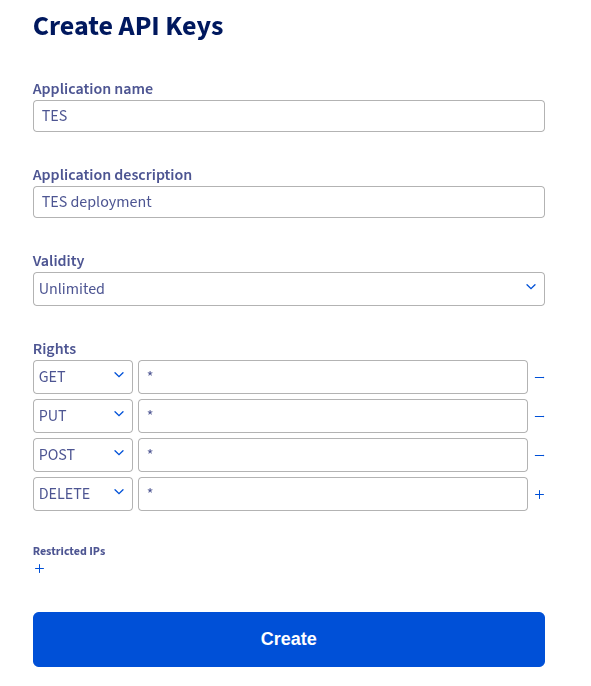
⭐ Important: These credentials are automatically loaded by the installer from ~/.ovh.conf during the installation process.
P.4 kubectl
Kubectl is the client to interact with the kubernetes cluster. We install it as a standalone binary into the conda env:
BIN_DIR=$(dirname $(which python3))
mkdir -p kubectl_release
cd kubectl_release
# latest version:
curl -LO "https://dl.k8s.io/release/$(curl -L -s https://dl.k8s.io/release/stable.txt)/bin/linux/amd64/kubectl"
chmod +x kubectl
mv kubectl "$BIN_DIR"
cd ..
P.5 AWS CLI
The AWS CLI is installed to interact with S3-objects within the OVHcloud. Their object storage is fully s3-compatibly, so they suggest to use the aws-cli using custom endpoints.
We install the client into the conda env:
BIN_DIR=$(dirname $(which python3))
mkdir -p awscli_release
cd awscli_release
# latest version:
curl "https://awscli.amazonaws.com/awscli-exe-linux-x86_64.zip" -o "awscliv2.zip"
unzip awscliv2.zip
./aws/install --bin-dir "$BIN_DIR" --install-dir "$BIN_DIR/../"
Setup of the credentials will happen later.
P.6 openstack
The openstack client is installed into the conda env, and used to interact with some components of OVHcloud:
pip install python-openstackclient
Get the credentials (see point 8)
P.7 pip modules
The following pip modules must be installed into the conda env:
pip install python-manilaclient
P.8 Create User
An OVH user must be created with sufficients rights to handle the deployment:
- Go to : OVHcloud Manager : Public Cloud : Users & Roles
- Create a user with at least these permissions :
| Permission | Needed for |
|---|---|
| Share Operator | NFS access |
| Volume Operator | Block device handling |
| Network Operator | VPC access |
| Compute Operator | Karpenter scaling |
| KeyManager Operator | LUKS encryption |
| Administrator | LUKS encryption * |
-
Click the three dots, and select “Generate a password”
⭐ Keep this password at hand, you need to provide it in the command below ! -
Click the three dots, and select “Download Openstack configuration file”. Select your deployment region (eg GRA9) and download the file. Next, convert it to yaml:
NOTE: Make sure to update ovh-gra9 to the correct region if relevant!
mkdir -p ~/.config/openstack

# Source the RC file once (it will prompt for password)
source ~/openrc-tes-pilot.sh

# Generate clouds.yaml from the sourced env vars
cat > ~/.config/openstack/clouds.yaml << EOF
clouds:
  ovh-gra9:
    auth:
      auth_url: ${OS_AUTH_URL}
      username: ${OS_USERNAME}
      password: ${OS_PASSWORD}
      project_id: ${OS_TENANT_ID}
      user_domain_name: Default
      project_domain_name: Default
    region_name: ${OS_REGION_NAME}
    interface: public
    identity_api_version: 3
EOF

chmod 600 ~/.config/openstack/clouds.yaml
- Validate:
# match your config region above
export OS_CLOUD=ovh-gra9
openstack server list --limit 1
* Note : the admin was added to make handling of encrypted block devices work. I suppose it should be possible to lower the rights, but haven’t figured out how yet. Let me know if you do :-)
P.8 OVHcloud Project Requirements
- Project created and activated in OVHcloud Manager
- Project ID noted (visible in beta-navigation as : Manager → Public Cloud : Top left)
P.9 Quotas & Capacity
Before starting, ensure your OVHcloud project has sufficient quota:
| Resource | Minimal | Notes |
|---|---|---|
| Compute (vCPU cores) | 100+ | For Karpenter autoscaling |
| RAM (GB) | 300+ | Depends on workflow demands |
| Cinder Volumes | 500+ GB total | Task disk storage (auto-expandable) |
| Cinder snapshots | N/A | Not used |
| Floating IPs | 1 | For MKS external LoadBalancer |
| Security groups | Default OK | Rules auto-created by cluster |
| Manila shares | 1 (150+ GB) | NFS storage |
| S3 buckets | 1 | Task I/O storage |
(E)nvironment Setup
E.1: Download Installer script
mkdir -p ovh_installer
cd ovh_installer
wget https://geertvandeweyer.github.io/ovh/files/ovh_installer.tar.gz
E.2: Configure Environment Variables
Edit env.variables. In the top half (“MANDATORY VARIABLES”), review and complete all required settings. Some variables requiring specific values are highlighted below:
| Variable Name | Notes |
|---|---|
| OVH_PROJECT_ID | See Manager:Public Cloud: Menu on the left |
| OVH_REGION | In capitals (eg GRA9) |
| K8S_VERSION | Tested with 1.31 and 1.34 |
| SYSTEM_FLAVOR | This node is on 24/7, d2-4 should be sufficient, enlarge if you run out of memory/cpu |
| WORKER FAMILIES | Families to pick workers from |
| EXCLUDE_TYPES | Instance types in the families above to discard (eg, gpu, windows, …) |
| OVH_*_QUOTA | Your quota values, set as upper limits in instance types |
| WORKER_MAX_* | Similar, limit the instance type sizes |
| *_IMAGE(TAG) | Karpenter and Funnel are deployed from images built by me. Change these to use upstream versions |
| MPR_* | Settings related to the private docker registry, adapt to your needs |
| EXTERNAL_IP | We deploy cromwell on-prem to reduce costs (relatively high resource demands). This IP is the only IP that will be granted access to the Funnel server |
| OVH_S3_* | Settings for your (cromwell) bucket. The bucket will be created during install and holds delocalized data after task execution |
| READ_BUCKETS | Additional buckets that TES tasks are allowed to read from |
| WRITE_BUCKETS | Additional buckets that TES tasks are allowed to write to |
| FILE_STORAGE_* | NFS settings, adapt to your needs |
| NFS_MOUNT_PATH | Path where NFS is mounted in containers. Make sure to match this on Cromwell to enable call-caching |
| WORK_DIR_* | Settings for autoscaled scratch dir. Adapt to your needs/expected workload |
| OS_CLOUD | Match the openstack yaml setting from prerequisites step 7 |
E.3: Verify Prerequisites
# Check all tools are available
which ovhcloud openstack kubectl helm envsubst docker
# Check OVHcloud login
ovhcloud account get
# Check OpenStack access (no errors, is empty for now)
openstack server list --limit 1
# Check Docker registry access (if using custom images)
docker login  # if needed
(D)eploy Cluster
What Happens
The installer orchestrates all setup in ordered phases (0–8) to provision OVH resources, deploy Karpenter and Funnel, and configure Cromwell integration.
- Phase 0: Validate environment variables, credentials, prerequisite CLIs
- Phase 1: Create private Neutron network + MKS cluster + kubeconfig
- Phase 2: Install Karpenter, create system node and worker nodepool
- Phase 3: Create Manila NFS share, deploy NFS CSI and keepalive DaemonSet
- Phase 4: Create S3 bucket and credentials
- Phase 4.2: Create private registry and secrets for image pulls
- Phase 5: Deploy Funnel resources (namespace/CRs/deployments/services)
- Phase 6: Configure micromamba activation env script
- Phase 7: Print Cromwell TES backend config snippet
- Phase 8: Smoke test Funnel
/v1/service-info
Execution
cd installer/
./install-ovh-mks.sh
The script may ask for confirmations, and behavior is driven by env.variables.
Phase 1: Create MKS Cluster
Goal
Provision OVH cloud network and control plane in a fully managed MKS cluster; output kubeconfig for kubectl.
What Gets Created
- Private Neutron network:
${PRIV_NET_NAME}in OVH region - Subnet and gateway reservation (for LoadBalancer services)
- MKS Kubernetes cluster:
${K8S_CLUSTER_NAME} ~/.kube/ovh-tes.yamlkubeconfig
Expected Output
============================================
 Phase 1: Create MKS cluster
============================================

Checking for existing private network 'tes-private-net'...
Creating private network 'tes-private-net' in GRA9...
✅ Private network created: a3bcde13-4dfd-4a83-bce1-08509c53bc7d

Creating MKS cluster 'tes-pilot' (Kubernetes 1.31)...
[Waiting for cluster to reach ACTIVE status...]
  [15s/600s] cluster status: DEPLOYING — waiting...
  [30s/600s] cluster status: DEPLOYING — waiting...
  ...
✅ MKS cluster is ACTIVE

Kubeconfig saved to: /home/user/.kube/ovh-tes.yaml
Common Issues
- OVH quotas insufficient for requested cluster size or network cannot be created
- OpenStack credentials (
~/.config/openstack/clouds.yaml) missing or invalid ovhcloud loginnot authenticated
Manual Verification
export KUBECONFIG=~/.kube/ovh-tes.yaml
kubectl get nodes
kubectl get ns
kubectl get svc --all-namespaces
✅ Phase 1 Checklist
- Private network created (
ovhcloud cloud network private list) - MKS cluster state
ACTIVE(ovhcloud cloud kube list) - kubeconfig exists and connects (
kubectl cluster-info) - Base node(s) ready (
kubectl get nodes)
Phase 2: Node Pools & Autoscaling
Goal
Set up Karpenter autoscaling to manage worker nodes dynamically and constrain instance types to quotas. I didn’t use the built-in autoscaler from OVHcloud for the following reasons:
- More flexibility in instance-type selection (see below).
- Advanced node configuration to enable scratch autoscaling and NFS setup.
The OVH Karpenter provider bin-packs pending pods onto as few nodes as possible. Without proper instance-type filtering, it would select the largest flavor available, potentially leading to quota rejection. With filtering + limits, Karpenter respects the resource constraints in your project.
What Happens
This phase:
- Creates Karpenter node autoscaler (replaces OVH’s simpler Cluster Autoscaler)
- Restricts instance types to right-sized families (e.g.,
c3only) with per-flavor vCPU/RAM caps - Sets NodePool resource limits based on OVH quota to prevent
412 InsufficientVCPUsQuotaerrors - Configures consolidation (scales down when not needed)
Execution
The installer continues after Phase 1. Expected output for Phase 2 & 2.5:
============================================
 Phase 2: Create node pools
============================================

Creating node pool 'workers' with flavors: c3
✅ Node pool created

============================================
 Phase 2.5: Karpenter node autoscaler
============================================

Installing Karpenter + OVHcloud provider...
[Helm installing karpenter-ovhcloud...]
deployment "karpenter" successfully rolled out
✅ Karpenter deployed (replicas: 2, high availability)
✅ NodePool 'workers' configured: c3 family, vCPU limit 32
Configuration Details
Karpenter NodePool (workers):
This configuration is rendered during install, based on your env.variables settings.
requirements:
  - key: kubernetes.io/arch
    operator: In
    values: [amd64]
  - key: node.kubernetes.io/instance-type
    operator: In
    values: [b3-8, c3-4, c3-8, c3-16, r3-32]  # Only right-sized compute flavors
limits:
  cpu: "32"        # Reserve 2 vCPU for system node (34 - 2)
  memory: "426Gi"  # Reserve 4 GB for system node (430 - 4)
consolidateAfter: 5m      # Scale down idle nodes after 5 min
consolidationPolicy: WhenEmpty  # Consolidate empty nodes
Flavor selection (Karpenter selects based on workload fit within limits):
Set these in env.variables :
WORKER_FAMILIES: controls allowed families (e.g.b3,c3,r3,g3)WORKER_MAX_VCPU/WORKER_MAX_RAM_GB: cap per flavor to keep within quotaOVH_VCPU_QUOTA/OVH_RAM_QUOTA_GB: cluster-level caps in script logicEXCLUDE_TYPES: Explicit list of patterns to skip instance types (e.g. : win,gpu,rtx)
Common families:
d2: Discovery instances (tiny and cheap)c2/c3: compute-optimized (best cost / general CPU-bound workloads)r2/r3: memory-optimized (high RAM per vCPU, useful for large in-memory tasks)
Note: Second Generation instance (e.g.
c2) are not necessarily cheaper for similar resources compared to third generation! Note: The effective configured instance-type list is computed byupdate-nodepool-flavors.shusing current OVH flavor catalog + those env variables.
Print configured Karpenter flavors
From cluster:
kubectl get nodepool -n karpenter workers -o jsonpath='{.spec.template.spec.requirements[?(@.key=="node.kubernetes.io/instance-type")].values}'
Verification
kubectl get nodepools
# NAME      NODECLASS   NODES   READY   AGE
# workers   default     0       True    5m

kubectl get nodeclaims
# (empty initially — only creates when pods are scheduled)

kubectl logs -n karpenter -l app.kubernetes.io/name=karpenter | tail -20
# Check for "Karpenter v0.32.x" message

kubectl get nodepool workers -o yaml | grep -A2 limits
# Matches your set project limits
⚙️ Quota Management
Environment Variables (in env.variables):
To summarize : These variables define your total k8s cluster capacity.
WORKER_FAMILIES="c3"           # Only compute family (not GPU/HPC/memory)
OVH_VCPU_QUOTA="34"            # Total vCPU quota
OVH_RAM_QUOTA_GB="430"         # Total RAM quota
WORKER_MAX_VCPU="16"           # Per-flavor vCPU cap
WORKER_MAX_RAM_GB="32"         # Per-flavor RAM cap
These variables:
- Filter flavors at install time (excludes oversized instances)
- Set NodePool limits to prevent over-provisioning
- Enable per-flavor caps to avoid selecting resource-heavy outliers
Note : Quota are Project-specific.
To inspect your current quota:
openstack quota show
Common Issues
- Missing OVH API credentials for Karpenter app key / consumer key
- NodePool flavor list returns empty if filtering is too strict
karpenterpods stuck in CrashLoopBackOff due to RBAC or secret issues
✅ Phase 2 Checklist
- Karpenter deployment shows Running
- NodePool “workers” is Ready and contains only acceptable instance flavors
- Karpenter logs show no errors
- NodePool limits match your OVH quota
🔧 Updating Karpenter Configuration Post-Deployment
If you need to change quota limits or flavors after initial deployment, use the standalone update script:
# Edit env.variables with new quota values
vim ./env.variables

# Regenerate and apply the NodePool
./update-nodepool-flavors.sh ./env.variables

# Karpenter will reconcile within ~30s
kubectl get nodeclaim -w
This script:
- Fetches the latest available flavors from OVH API
- Filters based on
WORKER_FAMILIESand per-flavor caps - Generates a new NodePool YAML with updated limits
- Applies it to the cluster without redeploying Karpenter
Phase 3: Manila NFS Shared Storage
Goal
Provide a shared RWX file system for task outputs and workflow caching via OVH Manila NFS.
What Gets Created
- OVH Manila NFS share (
FILE_STORAGE_SIZE,FILE_STORAGE_SHARE_TYPE) - Access rule bound to the private Neutron vRack
- Kubernetes StorageClass / PVC for NFS
wait-for-nfs-csi-socketDaemonSet (wait for NFS mount on fresh nodes)
Expected Output
============================================
 Phase 3: Manila NFS shared storage
============================================

Creating Manila share 'tes-shared' (150 GB)...
[Waiting for share to reach AVAILABLE status...]
  [15s/600s] share status: CREATING — waiting...
  ...
✅ Manila share created

Creating access rule (private network access)...
✅ Manila access rule created

Creating StorageClass 'manila-nfs'...
✅ StorageClass created

Deploying NFS mount DaemonSet + CSI driver...
✅ DaemonSet deployed (pod per worker node)
Potential Issues
- NFS share in
ERRORstate due quotas or network mismatch - DaemonSet fails to start if RBAC/nodes labels are missing
File system has stale NFS handleif keepalive not running
Manual Verification
kubectl get pvc -n funnel
# shows the manila-shared-pvc volume claim with set capacity

kubectl get storageclass manila-nfs
# shows some details on the manila-nfs volume

kubectl exec -n funnel $(kubectl get pod -n funnel -l app=funnel-disk-setup -o jsonpath='{.items[0].metadata.name}') -- ls /mnt/shared
# when pods are running : show contents of the NFS volume

kubectl exec -n funnel $(kubectl get pod -n funnel -l app=funnel-disk-setup -o jsonpath='{.items[0].metadata.name}') -- ls -la /mnt/shared/.keepalive
# when pods are running : show last access time of the .keepalive pointer
✅ Phase 3 Checklist
- Manila share is AVAILABLE
manila-shared-pvcis Bound/mnt/sharedis mounted and accessible
Phase 4: S3 Object Storage
Goal
Create and configure OVH-compatible S3 for Funnel task input/output and logs.
What Gets Created
- S3 credentials (access key/secret) for the cloud user
- S3 bucket (
OVH_S3_BUCKET) under that user permissions - Kubernetes Secret
ovh-s3-credentialswith base64 values
Expected Output
============================================
 Phase 4: S3 bucket + credentials
============================================

Creating S3 bucket 'tes-tasks-...-gra9'...
✅ S3 bucket created

Creating S3 credentials (access key + secret)...
✅ S3 credentials created

Storing credentials in Kubernetes Secret 'ovh-s3-credentials'...
✅ Secret created
Potential Issues
- 403 on bucket operations when S3 user mismatch occurs (bucket creation with wrong identity)
- Existing access key without secret available (requires rotate or manual secret entry)
- Wrong endpoint region mapping (
gravsgra9)
Manual Verification
export AWS_ACCESS_KEY_ID=$(kubectl get secret -n funnel ovh-s3-credentials -o jsonpath='{.data.s3_access_key}' | base64 -d)
export AWS_SECRET_ACCESS_KEY=$(kubectl get secret -n funnel ovh-s3-credentials -o jsonpath='{.data.s3_secret_key}' | base64 -d)
aws --endpoint-url ${OVH_S3_ENDPOINT} --region ${OVH_S3_REGION} s3 ls
aws --endpoint-url ${OVH_S3_ENDPOINT} --region ${OVH_S3_REGION} s3api get-bucket-location --bucket ${OVH_S3_BUCKET}
kubectl get secret -n funnel ovh-s3-credentials -o yaml
✅ Phase 4 Checklist
- S3 bucket exists in OVH
ovh-s3-credentialssecret exists in namespace${TES_NAMESPACE}- Credentials are valid from an AWS CLI pod
Phase 5: Private Container Registry
What Happens
This phase is optional, you can use public dockerhub images. This phase performs:
- Creates an OVH Managed Private Registry (MPR) named
tes-mpr— a Harbor-based container registry - Generates Harbor admin credentials for the registry
- Creates a Harbor project (namespace) for your images
- Configures nerdctl registry auth on worker nodes so Funnel can pull private task images
- Optionally sets up K8s
imagePullSecretsfor the Funnel worker pod image itself
Why a Private Registry?
- Control: Store custom bioinformatics images (GATK wrappers, pipeline tools, etc.)
- Security: Private images not exposed to public Docker Hub
- Performance: Low-latency pulls within OVHcloud infrastructure (same region)
- Vulnerability scanning: M/L plans include Trivy for automatic scanning
- Harbor UI: Web interface for managing images, users, projects, and RBAC
Architecture
Important: Funnel uses
nerdctl(not Kubernetes) to pull and run task container images. This means KubernetesimagePullSecretsdo not apply to task images. Instead, registry credentials must be configured at the nerdctl/containerd level on each worker node.
┌──────────────────────────────────────────────────┐
│  OVH Managed Private Registry (Harbor)           │
│  Name: tes-mpr                                   │
│  URL: xxxxxxxx.gra9.container-registry.ovh.net   │
│  (S plan: 200 GB, 15 concurrent connections)     │
└───────────┬──────────────────────────────────────┘
            │
            │ (1) K8s imagePullSecrets → pulls Funnel worker image
            │ (2) nerdctl login → pulls task container images
            │
   ┌────────▼─────────────────────────────────────────┐
   │  Kubernetes Cluster (MKS)                        │
   │  ┌────────────────────────────────────────────┐  │
   │  │ Funnel Worker Pod                          │  │
   │  │  ├─ image: <registry>/funnel:tag  ← (1)    │  │
   │  │  └─ nerdctl pull <registry>/task:tag ← (2) │  │
   │  └────────────────────────────────────────────┘  │
   └──────────────────────────────────────────────────┘
Plan Notes
- Choose the planned capacity based on expected image storage and concurrent task pulls.
- For simple testing,
Sis normally sufficient; upgrade toMorLas your load grows.
Create the Registry
Plan (S/M/L) is fetched from env.variables. After creation, the registry url is stored in that same file. Credentials are generated and set to allow access from workers.
Push Images to Your Registry
# 1. Login to your OVH registry (from your local machine)
docker login xxxxxxxx.gra9.container-registry.ovh.net \
  -u tes-admin \
  -p '<password>'

# 2. Tag your image for the registry
docker tag my-tool:v1.0 \
  xxxxxxxx.gra9.container-registry.ovh.net/cmgantwerpen/my-tool:v1.0

# 3. Push
docker push xxxxxxxx.gra9.container-registry.ovh.net/cmgantwerpen/my-tool:v1.0
Image naming convention:
xxxxxxxx.gra9.container-registry.ovh.net/cmgantwerpen/my-tool:v1.0
└──────────────────────────────────────┘ └──────────┘ └─────┘ └──┘
           Registry URL                     Project    Image   Tag
Use Private Images in WDL Workflows
task run_custom_analysis {
  input {
    File input_file
  }

  command {
    echo "Running analysis with private image..."
  }

  runtime {
    docker: "xxxxxxxx.gra9.container-registry.ovh.net/cmgantwerpen/my-tool:v1.0"
  }

  output {
    File result = stdout()
  }
}
Verification
# Check registry in OVHcloud Manager
#    Status should show "OK"

# Validate registry exists and is ready
ovhcloud cloud container-registry list --cloud-project ${OVH_PROJECT_ID}

# Check Kubernetes Secret and ConfigMap
kubectl -n ${TES_NAMESPACE} get secret regcred -o yaml
kubectl -n ${TES_NAMESPACE} get configmap docker-registry-config -o yaml

# Test docker login from your machine : use MPR_HARBOR_USER/PASS
docker login xxxxxxxx.gra9.container-registry.ovh.net

# Verify Harbor UI access
#    Open: https://xxxxxxxx.gra9.container-registry.ovh.net
#    Should see your project and pushed images


# Test nerdctl pull from a worker node (via debug pod)
kubectl run -n funnel nerdctl-test --rm -it \
  --image=xxxxxxxx.gra9.container-registry.ovh.net/cmgantwerpen/my-tool:v1.0 \
  --overrides='{"spec":{"imagePullSecrets":[{"name":"regcred"}]}}' \
  --restart=Never \
  -- echo "Image pulled successfully!"
Potential Issues
docker loginfails on registry URL if username/password are incorrect- Task containers fail with
unauthorized: access deniedifnerdctlauth is missing in worker configmap - PR contains
registry not foundifMPR_REGISTRY_URLis misconfigured
✅ Phase 5 Checklist
- Registry “tes-mpr” created in GRA9 and READY
- Harbor credentials created and stored in env.variables
- Harbor project exists and image pushed
- K8s Secret
regcredexists in namespace${TES_NAMESPACE} - ConfigMap
docker-registry-configexists for nerdctl nerdctl pullworks from worker nodes
Phase 6: Deploy Funnel TES
What Happens
This phase:
- Creates Funnel namespace + RBAC
- Deploys Funnel Server (REST API, gRPC, task queue)
- Configures nerdctl executor for task container execution
- Sets up Cinder auto-expansion disk manager (daemonset)
- Exposes Funnel via LoadBalancer service
Key Configuration
Funnel Server ConfigMap (funnel-configmap.yaml):
Worker:
  WorkDir: /var/funnel-work     # Cinder volume, auto-expandable
  Container:
    DriverCommand: nerdctl      # Container executor
    RunCommand: run -i --net=host \
      --volume /mnt/shared:/mnt/shared:rw \  # NFS shared mount
      --volume /var/funnel-work:/var/funnel-work:rw \  # Task disk
Funnel Worker pods are created as Kubernetes Jobs with:
- DeamonSet:
funnel-disk-monitor: DaemonSet that does scratch setup & monitoring:- wait, mount & format LVM for /var/funnel-workon boot
- monitor disk usage : add disk => grow & extend FS
karpenter-node-overhead: ghost DaemonSet to correct for system-reserved memory & cpu during scheduling
- init-containers:
wait-for-workdir: polls for Cinder volume mountwait-for-nfs: polls for NFS availability
- main container:
funnel-worker(runs the executor & task submission loop)
Expected Execution Output
============================================
 Phase 6: Deploy Funnel
============================================

Creating Funnel namespace + RBAC...
✅ ServiceAccount, Role, RoleBinding created

Building funnel-disk-setup image (if needed)...
✅ Image already exists: docker.io/cmgantwerpen/funnel-disk-setup:v17

Deploying Funnel Server...
deployment "funnel" successfully rolled out
✅ Funnel Server running (1 replica)

Deploying funnel-disk-setup DaemonSet (Cinder auto-expander)...
daemonset "funnel-disk-setup" successfully rolled out
✅ DaemonSet deployed (pod per worker node)

Exposing Funnel via LoadBalancer...
✅ Service created (external IP: 51.68.237.8)
Verification
# Check Funnel Server
kubectl get deployment -n funnel
# NAME     READY   UP-TO-DATE   AVAILABLE   AGE
# funnel   1/1     1            1           5m

# Check Funnel Server is listening
kubectl logs -n funnel deployment/funnel | grep "listening"
# Should see: "Listening on :8000" + ":9090"

# Check Cinder auto-expander DaemonSet
kubectl get daemonset -n funnel
# NAME                  DESIRED   CURRENT   READY   UP-TO-DATE   AGE
# funnel-disk-setup     1         1         1       1            3m

# Check LoadBalancer external IP
kubectl get svc -n funnel
# NAME                 TYPE           CLUSTER-IP       EXTERNAL-IP      PORT(S)
# funnel-lb            LoadBalancer   10.0.1.234       51.68.237.8      8000:32000/TCP,9090:31234/TCP
# tes-service          ClusterIP      10.0.1.235       <none>           9090/TCP

# Test Funnel API
curl http://${LB_ENDPOINT}/v1/tasks
# Should return: {"tasks":[]}  (empty initially)
Potential Issues
- Funnel deployment may stay Pending if Karpenter cannot schedule worker nodes (quota limits or nodepool constraints)
- LoadBalancer IP may be delayed by OVH network provisioning
funnel-disk-setupdaemonset can fail if OpenStack credentials are invalid orCindervolume provisioning fails
✅ Phase 6 Checklist
- Funnel Server deployment is Ready
- LoadBalancer service has an external IP
funnel-disk-setupDaemonSet is Running on all worker nodescurl http://$LB_ENDPOINT/v1/tasksreturns 200 JSON
Phase 7: Configure Cromwell
Cromwell version
I’ve created a pull request against the upstream repo with support for custom s3 endpoints and TES improvements (see ../pull-requests). While this PR is pending, use the JAR from https://github.com/geertvandeweyer/cromwell/releases/tag/TES
What Happens
This phase prepares some configuration snippets for Cromwell for TES submission, but doesn’t deploy it (Cromwell is typically run locally on your machine):
- Generates cromwell-tes.conf (Cromwell ↔ Funnel TES config)
- Outputs Cromwell startup command for local execution
Expected Execution Output
============================================
 Phase 7: Cromwell configuration
============================================

Add the following to your cromwell-tes.conf :

...
Configuration Details
Key settings in cromwell-tes.conf:
webservice {
    interface = 0.0.0.0
    # remember the port to connect afterwards
    port = 7900
    binding-timeout = 60s

}


backend {
  default = "tes"

  providers {
    tes {
      actor-factory = "cromwell.backend.impl.tes.TesBackendLifecycleActorFactory"
      config {
        root = "s3://tes-tasks-c386d174c0974008bac7b36c4dfafb23-gra9/cromwell/" # created bucket
        tes_endpoint = "http://51.68.237.8:8000"  # Funnel LoadBalancer

        default-runtime-attributes {
          cpu: 1
          failOnStderr: false
          continueOnReturnCode: 0
          memory: "2 GB"
          disk: "2 GB"  # arbitrary, scratch is autoscaled
          memory_retry_multiplier: 1.5
          # maximal retries of failed tasks (by cromwell)
          maxRetries: 2
          # Default Kubernetes pod backoff limit (spot interruption / eviction retries).
          # Passed to Funnel as backend_parameters["backoff_limit"].
          # Override per-task in WDL: runtime { backoff_limit: "5" }
          #  => These retries are not seen by cromwell. Total is maxRetries * backoff_limit
          backoff_limit: "3"
        }
        # Enable TES 1.1 backend_parameters passthrough so runtime attributes
        # (e.g. backoff_limit) are forwarded to Funnel as backend_parameters.
        use_tes_11_preview_backend_parameters = true

        filesystems {
          s3 {
            auth = "default"
            caching {
                # reference uses original s3 location, BUT be aware if cleaning up while running subsequent calls !
                duplication-strategy = "reference"
                # Use S3 ETags for call-cache hashing (avoids downloading the file).
                # Without this, Cromwell falls back to MD5 which S3 cannot provide,
                # disabling call-caching for any S3-backed input file.
                hashing-strategy = "etag"
            }
          }
          ## NFS is seen as local
          local {

            # Mount point of the shared filesystem inside every TES worker container.
            # Only paths under this root are treated as "already present" and excluded
            # from TES input localisation. Backward-compat: legacy key `efs` also accepted.
            # Examples: /mnt/shared (Manila NFS on OVH/K8s), /mnt/efs (AWS EFS)
            local-root = "/mnt/shared"
            caching {
                # Avoid re-downloading / re-hashing files on shared FS: use a sibling .md5 file
                # if present. Beware: .md5 siblings are NOT auto-removed on file changes.
                check-sibling-md5: true
            }
          }
        }
      }
    }
  }
}

filesystems {
  # no reference to custom endpoins here
  s3 {
    class = "cromwell.filesystems.s3.S3PathBuilderFactory"
  }
}

# engine filesystems allow cromwell itself to interact with data (eg read a file in a workflow run locally)
engine {
  filesystems {
    local {
	enabled : true
    }
    # no references to custom endpoint here
    s3 {
        auth = "default",
        enabled = true,
    	## at what size should we start using multipart uploads ?
        MultipartThreshold = "4G",
        ## multipart copying threads.
        threads = 100,
        # what is link between http.connections, s3.threads  and io-dispatcher.threads ?
        httpclient {
            maxConnections = 1024
        }
    }
  }
}

# root level 'aws' block contains the custom endpoints.
aws {

  application-name = "cromwell"
  auths = [
    {
      name = "default"
      scheme = "custom_keys"
      access-key = "OVH S3 KEY"
      secret-key = "OVH S3 SECRET"
    }
  ]
  region = "gra"
  # OVH Object Storage S3-compatible endpoint (GRA region)
  endpoint-url = "https://s3.gra.io.cloud.ovh.net"
}
Verification
# launch in server mode, check cromwell.log for startup problems:
java -DLOG_LEVEL=$LOG_LEVEL -Dconfig.file="$CROMWELL_CONFIG_OUT" -jar "$CROMWELL_BINARY" server > cromwell.log 2>&1 &


# Check Cromwell is accepting submissions on the configured port
curl -s http://localhost:7900/api/workflows/v1 | python3 -m json.tool

# Submit a test workflow (see cromwell section)
✅ Phase 7 Checklist
- cromwell-tes.conf examples are rendered with correct endpoints
- Cromwell can be started successfully (check cromwell.log)
- Cromwell API responds at http://localhost:7900
Phase 8: Verification & Testing
Smoke Test: Submit Test Pods
The installer will execute the included test script:
./test-disk-handling.sh
These tests will :
- check NFS mount visibility inside task containers
- check read/write access to
/mnt/shared - check cleanup of worker disks
To monitor manually during testing, run this watch :
watch -n 1 'kubectl get nodes -o wide ; echo "" ; echo "" ; kubectl get pods -o wide -n funnel ; echo "" ; echo ""; openstack volume list -c Name -c Size -c status -c "Attached to" '
Expected Execution Output
Tests are launched:
── Step 0: Baseline Cinder volumes ──────────────────────────────
[OK]    No pre-existing funnel Cinder volumes — clean baseline.

── Step 1: Set Karpenter consolidateAfter=1m ──
nodepool.karpenter.sh/workers patched
[OK]    consolidateAfter set to 1m (was 5m)

── Step 2: Submit tasks ─────────────────────────────────────────
[OK]    Task A (hello):      d72jlq3tms2s73aul7jg
[OK]    Task B (disk-write): d72jlq3tms2s73aul7k0
[OK]    Task C (nfs-check):  d72jlq3tms2s73aul7kg

[OK]    Task D (nfs-race):   d72jlq3tms2s73aul7l0
Followed by status updates, untill cleanup:
── Step 4: Wait for tasks to complete ──────────────────────────
[OK]    Task A (hello)       COMPLETE
[OK]    Task B (disk-write)  COMPLETE
[OK]    Task C (nfs-check)   COMPLETE
[OK]    Task D (nfs-race)    COMPLETE

# ... some task output ...


### Potential Issues

- No Nodes are starting : The in-browser authentication was not successfull:
  - `clear` : sed -i 's/^KARPENTER_CONSUMER_KEY=.*/KARPENTER_CONSUMER_KEY=""/' env.variables
  - `reset` : ./install-ovh-mks.sh


### Full Verification Checklist

```bash
#!/bin/bash
# Comprehensive cluster health check

KUBECONFIG=~/.kube/ovh-tes.yaml

echo "=== Cluster Health ==="
kubectl get nodes -o wide
kubectl get clusterroles | head -5

echo "=== Storage ==="
kubectl get pvc -A
kubectl get sc

echo "=== Funnel ==="
kubectl get deployment,daemonset,pod -n funnel -o wide

echo "=== Networking ==="
kubectl get svc -n funnel -o wide

echo "=== Resource Usage ==="
kubectl top nodes 2>/dev/null || echo "(metrics-server not ready)"
kubectl top pods -n funnel 2>/dev/null || echo "(metrics-server not ready)"

echo "=== S3 Bucket ==="
aws s3 ls --profile ovh

echo "=== NFS Test ==="
kubectl exec -n funnel $(kubectl get pod -n funnel -l app=funnel-disk-setup -o name | head -1) -- \
  mountpoint /mnt/shared && echo "✅ NFS mounted" || echo "❌ NFS not mounted"
Container Images
Custom-Built Images
These images are built from source in this repository and may be rebuilt if you modify the code:
1. funnel-disk-setup:v17
Purpose: Cinder volume mount + auto-expansion + NFS keepalive DaemonSet
Source: OVH_installer/installer/disk-autoscaler/Dockerfile
Responsibilities:
- Mount Cinder volumes at
/var/funnel-workusing/dev/openstacklabels - LUKS unlock (using passphrase from env)
- LVM extend (auto-expansion when disk fill reaches threshold)
- NFS mount (
setup-nfs-hostcontainer in Funnel worker Job initContainers) - Keepalive loop (touch
/mnt/shared/.keepaliveevery 30s)
Build:
cd OVH_installer/installer/disk-autoscaler
docker build -t docker.io/cmgantwerpen/funnel-disk-setup:v18 .
docker push docker.io/cmgantwerpen/funnel-disk-setup:v18
Update in env.variables:
FUNNEL_DISK_SETUP_IMAGE="docker.io/cmgantwerpen/funnel-disk-setup:v18"
2. Karpenter OVHcloud Provider
Purpose: Kubernetes node autoscaler for OVHcloud
Repository: antonin-a/karpenter-provider-ovhcloud (forked & maintained separately)
Source: karpenter-provider-ovhcloud/ (in this workspace)
Our version: Built on main branch; includes OVHcloud API integration for node creation/deletion
Build (if modifying):
cd karpenter-provider-ovhcloud
docker build -t docker.io/cmgantwerpen/karpenter-provider-ovhcloud:latest .
docker push docker.io/cmgantwerpen/karpenter-provider-ovhcloud:latest
Helm value override (in install-ovh-mks.sh):
--set image.repository="cmgantwerpen/karpenter-provider-ovhcloud:latest"
Forked/Third-Party Images
These are published external images; we point to them but don’t build them:
1. Funnel TES
Purpose: Task execution service (REST API + gRPC, nerdctl executor)
Repository: ohsu-comp-bio/funnel (main)
Our branch: feat/k8s-ovh-improvements (in this workspace)
Published image: docker.io/cmgantwerpen/funnel:multiarch-revbe2fbce-s3fix
Tag explanation:
multiarch: supports arm64 + amd64revbe2fbce: Funnel git commits3fix: custom fix for OVH S3 compatibility
Source code location: funnel-src/cromwell/ (in this workspace, for reference only)
Credentials: Stored in cromwell-src/ for audit trail
2. Ubuntu Base Image
Used by: Task containers (default)
Image: public.ecr.aws/lts/ubuntu:latest (AWS ECR, public)
Note: No OVH-specific modifications; plain Ubuntu with essential tools
3. OVH Cloud Providers
Purpose: Cloud provider plugins for Kubernetes
- Manila CSI Driver: for NFS provisioning
- Cinder CSI Driver: for block storage
Deployed via: Helm charts during openstack-cloud-controller-manager init
Troubleshooting
Issue: Task pods failing with “cannot stat ‘/mnt/shared’: Input/output error”
Cause: NFS mount dropped (idle TCP timeout).
Solution:
- Check NFS keepalive DaemonSet is running:
kubectl get daemonset -n funnel funnel-disk-setup kubectl logs -n funnel -l app=funnel-disk-setup -c holder | tail -20 - Verify
.keepalivetouchdowns are happening:kubectl exec -n funnel $(kubectl get pod -n funnel -l app=funnel-disk-setup -o name | head -1) -- \ ls -la /mnt/shared/.keepalive # Should show recent timestamp - If stale, manually remount:
kubectl delete pods -n funnel -l app=funnel-disk-setup
# DaemonSet will recreate them and remount NFS
Issue: Karpenter not scaling up nodes when tasks arrive
Cause: Insufficient quota, wrong instance-type filtering, or node pool configuration issue.
Diagnosis:
# Check nodeclaims status
kubectl get nodeclaims -A
kubectl describe nodeclaim <name>

# Check Karpenter logs
kubectl logs -n karpenter -l app.kubernetes.io/name=karpenter | tail -50

# Check node pool limits and instance-type requirement
kubectl get nodepool workers -o yaml | grep -A 10 "limits:\|instance-type"

# Check if pods are stuck in Pending
kubectl get pods -n funnel
Symptoms & Solutions:
| Symptom | Cause | Solution |
|---|---|---|
InsufficientVCPUsQuota (412) in NodeClaim status |
Karpenter selecting oversized flavors (e.g., a10-90 90vCPU) that exceed your OVH quota |
Verify node.kubernetes.io/instance-type requirement only lists c3 flavors; use update-nodepool-flavors.sh if needed |
NodeClaim stuck in Unknown for >5min |
NodePool limits exceeded or incompatible instance types | Check limits.cpu and limits.memory match your OVH quota; update with ./update-nodepool-flavors.sh |
NoCompatibleInstanceTypes event |
Instance-type filtering removed all compatible flavors | Verify WORKER_FAMILIES, WORKER_MAX_VCPU, WORKER_MAX_RAM_GB are set correctly in env.variables |
| Nodes provisioning but pods stay Pending | Node resource capacity exhausted | Increase OVH_VCPU_QUOTA or reduce task resource requests |
Common fix:
# Re-run the flavor update script to regenerate NodePool with correct filtering
cd ./OVH_installer/installer
./update-nodepool-flavors.sh ./env.variables

# Check the updated NodePool
kubectl get nodepool workers -o yaml | grep -A 10 "instance-type"

# Karpenter will reconcile within ~30s
kubectl get nodeclaim -w
Issue: NFS mount failures during cluster startup
Cause: Private network not created before MKS cluster creation.
Prevention: Always run Phase 1 (it creates the network first).
Recovery (if it happened):
# Recreate private network manually
openstack network create tes-private-net \
  --provider:network_type vxlan \
  --provider:segmentation_id 0

# Then redeploy Funnel
cd OVH_installer/installer
./install-ovh-mks.sh
# Skip to Phase 5
Issue: S3 bucket access “Access Denied”
Cause: Credentials invalid or bucket policy misconfigured.
Diagnosis:
# Check credentials in Secret
kubectl get secret -n funnel ovh-s3-credentials -o yaml

# Test credentials locally
export AWS_ACCESS_KEY_ID=$(echo "..." | base64 -d)
export AWS_SECRET_ACCESS_KEY=$(echo "..." | base64 -d)
aws s3 ls --endpoint-url https://s3.gra.io.cloud.ovh.net
Solution:
- Regenerate S3 credentials in OVH Manager
- Update
OVH_S3_ACCESS_KEYandOVH_S3_SECRET_KEYinenv.variables - Rerun Phase 4 to update the Kubernetes Secret
- Restart Funnel pods:
kubectl rollout restart deployment/funnel -n funnel
Issue: Cromwell submits workflow but Funnel never receives task
Cause: Cromwell → Funnel network connectivity issue.
Diagnosis:
# Check Funnel LoadBalancer service
kubectl get svc -n funnel
# Should show external IP

# Test connectivity from local machine
curl -I http://<EXTERNAL_IP>:8000/api/v1/tasks

# Check Funnel server logs
kubectl logs -n funnel deployment/funnel | grep -i "error\|listening"

# Check network policies aren't blocking
kubectl get networkpolicies -A
Solution:
- If Funnel service has no external IP: Check OVH project quotas (Floating IP count)
- If connectivity timeout: Verify security group allows port 8000 (TCP)
Issue: Karpenter pod CPU/memory throttled
Symptom: Karpenter logs show reconciliation timeouts; nodes not scaling quickly.
Cause: Too many node types in instance selector (expensive reconciliation).
Solution:
# Reduce instance type diversity
kubectl edit nodepool workers
# Change .spec.template.spec.requirements[].values to subset:
# - "c3-4"   (small: 2 vCPU, 8 GB)
# - "b2-7"   (medium: 2 vCPU, 7 GB)
# - "r3-8"   (large: 4 vCPU, 32 GB)
# Karpenter will still pick cheapest option that fits
Appendix: Useful Commands
Cluster Inspection
export KUBECONFIG=~/.kube/ovh-tes.yaml

# Nodes
kubectl get nodes -o wide
kubectl describe node <node-name>
kubectl top node

# Pods across all namespaces
kubectl get pods -A
kubectl get pods -n funnel -o wide

# Storage
kubectl get pv,pvc -A
kubectl get storageclass

# Network
kubectl get svc -A -o wide
kubectl get ing -A
Logs & Debugging
# Funnel server
kubectl logs -n funnel deployment/funnel -f

# Funnel worker (task executor) for specific task
kubectl logs -n funnel <task-pod-name> -c funnel-worker

# Karpenter autoscaler
kubectl logs -n karpenter -l app.kubernetes.io/name=karpenter -f

# DaemonSet (NFS keeper)
kubectl logs -n funnel -l app=funnel-disk-setup -c holder

# Describe pod for events
kubectl describe pod -n funnel <pod-name>
S3 Operations
# List buckets
aws s3 ls --profile ovh

# List bucket contents
aws s3 ls s3://tes-tasks-c386d174c0974008bac7b36c4dfafb23-gra9/ --recursive

# Download file
aws s3 cp s3://tes-tasks-c386d174c0974008bac7b36c4dfafb23-gra9/cromwell/path/to/file ./local-file

# Clean old files
aws s3 rm s3://tes-tasks-c386d174c0974008bac7b36c4dfafb23-gra9/ --recursive --exclude "*" --include "cromwell/*" --older-than 30
NFS Operations
# Check NFS mount from DaemonSet pod
kubectl exec -n funnel <daemonset-pod> -- mountpoint /mnt/shared

# List NFS contents
kubectl exec -n funnel <daemonset-pod> -- ls -la /mnt/shared/gra9/

# Check disk usage
kubectl exec -n funnel <daemonset-pod> -- df -h /mnt/shared

# Delete old test files
kubectl exec -n funnel <daemonset-pod> -- rm -rf /mnt/shared/gra9/test/*
Workflow Submission (Cromwell CLI)
# Get all workflows
curl -s http://localhost:7900/api/workflows/v1 | python3 -m json.tool

# Get specific workflow status
curl -s http://localhost:7900/api/workflows/v1/<WF_ID>/status

# Get workflow outputs
curl -s http://localhost:7900/api/workflows/v1/<WF_ID>/outputs | python3 -m json.tool

# Get workflow metadata (detailed info)
curl -s http://localhost:7900/api/workflows/v1/<WF_ID>/metadata | python3 -m json.tool

# Abort workflow
curl -X POST http://localhost:7900/api/workflows/v1/<WF_ID>/abort
Summary
| Phase | Duration | Component | Verification |
|---|---|---|---|
| 0 | 5 min | Environment & tools | kubectl version |
| 1 | 15 min | MKS cluster | kubectl get nodes |
| 2 | 10 min | Karpenter autoscaler | kubectl get nodepool |
| 3 | 15 min | Manila NFS storage | kubectl get pvc -n funnel |
| 4 | 5 min | S3 object storage | aws s3 ls --profile ovh |
| 5 | 10 min | Funnel TES deployment | kubectl get svc -n funnel |
| 6 | 5 min | Cromwell configuration | curl http://localhost:7900/api/workflows/v1 |
| 7 | 5 min | Smoke test | EfsTest workflow Succeeded |
| Total | ~65 min | Full platform | ✅ Ready for production |
Document Version: 1.0
Last Updated: March 12, 2026
Maintainer: geert.vandeweyer@uza.be
Region: GRA9 (Gravelines, France)
Status: Complete, tested end-to-end with NFS keepalive